Join the National Data Challenge 2026!

Introduction

Every day, hospitals and research performing organisations create and store huge amounts of digital data – research files, datasets, reports, images, and everything in between. It's all essential to our work, but there's a side to this we don't often see. Behind every file sits physical infrastructure: servers running day and night, cooled by energy-intensive systems. Globally, data centers already use around 1% of all electricity, and that demand is only growing (REF). Even something as small as 1 terabyte of stored data can generate between 10 and 200 kg of CO₂ each year (REF). Because files are often backed up multiple times, the real impact is even higher. 

If you think about your own folders, it's easy to see how this happens. Old versions of documents, duplicate datasets, forgotten downloads; they all stick around. On their own, they seem insignificant, but together they quietly add to energy use, increase storage costs, and make it harder to find what you actually need. 

That's where the National Data Challenge comes in. Building on earlier sustainability efforts in Dutch labs, it's a chance to take a simple, practical step together. By clearing out what we no longer need, we can reduce our environmental footprint, make our digital workspaces cleaner and easier to use, and free up resources, so we can focus on what really matters: better research and better care for patients. Small deletions, big impact!  

The National Data Challenge is a national approach within Dutch UMC's, organized by UMCNL and Green Labs NL as part of the Green Deal Sustainable Healthcare.  

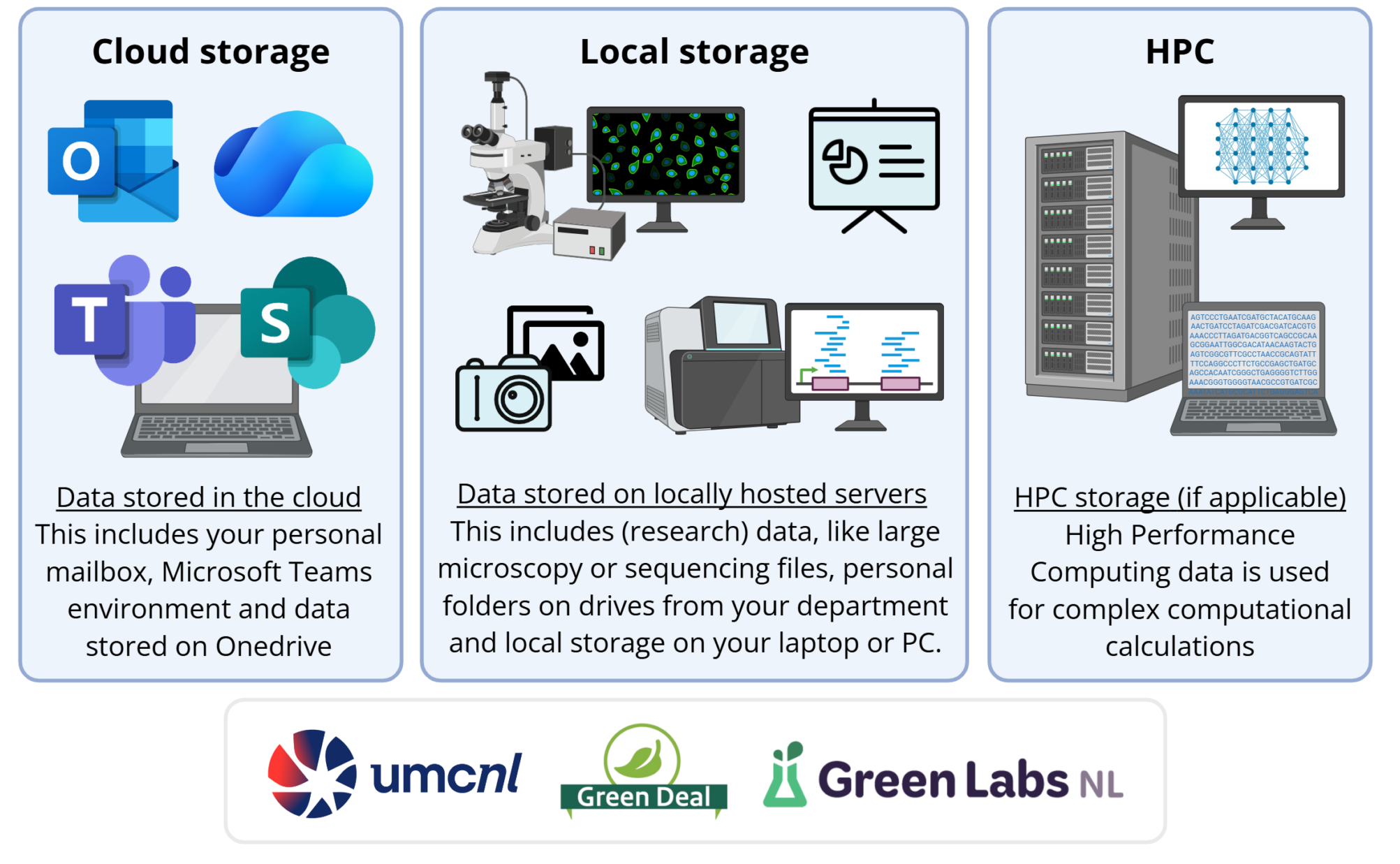
The National Data Challenge takes place at three levels:
How do I participate?

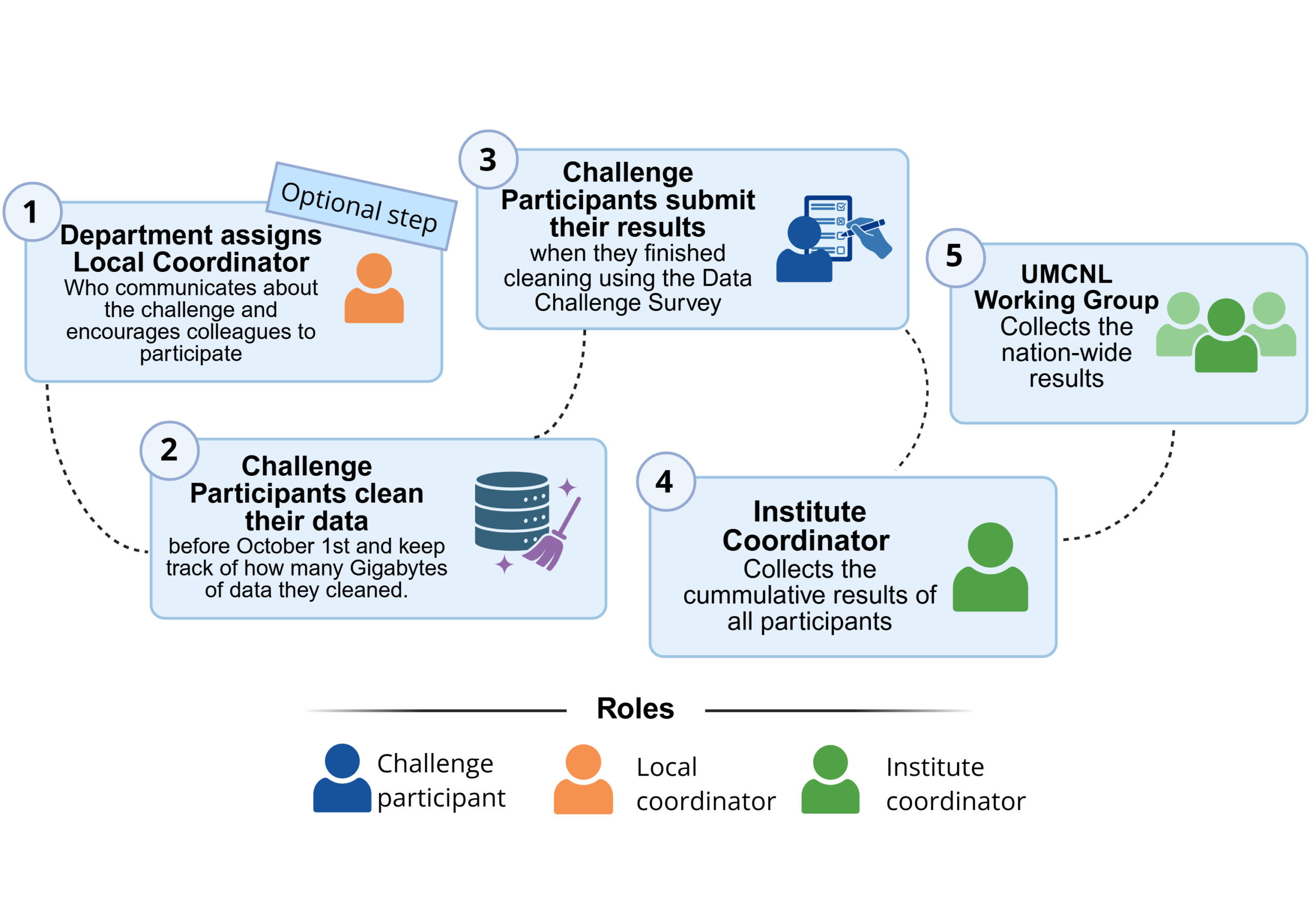
Participating in the challenge is simple: all you need to do is clean old data that is no longer needed from your folders. We defined the following steps:

1 – Assign a Local Coordinator (optional), who communicates about the challenge within your department. This can be a data steward, a local enthusiast for this initiative of the green team of your department.

2 – Clean your data, and keep track of how much data you cleaned by quantifying the size of your folders before and after you cleared data. Want to know how? Follow the step-by-step tutorial below on how to quantify data stored at each storage type.

3 – Submit your results via a Microsoft Forms questionnaire that is shared within your institute. You have until October 1st 2026 to clean your data and submit your results.

4 – The Institute Coordinator collects all the results from participants and calculates the result of your entire organisation.

5 – The National UMCNL working group for Sustainable Laboratories will quantify the national results.

Image generated with Biorender

National Data Challenge Resources

Information for Participants

  • Manual for Participants – This step-by-step tutorial contains all information on how to quantify the amount of data you clean for cloud-based, local and HPC storage [ENG / NL]

Communication material

  • Powerpoint slides Data Challenge – With a few slides to inform your department about the challenge and engage as many colleagues as possible to participate [coming soon]
  • Data Challenge Poster: To communicate locally about the challenge [ENG / NL]

Submit your results

  • Note that the link to the questionnaire to submit your results is different for each participating institute. Contact your institute coordinator to submit the results

Frequently Asked Questions

Find the answers to frequently asked questions by clicking on them below.

Yes. The manual is written with UMCs in mind, but the steps apply to any organisation: cloud storage, local drives and (if applicable) HPC environments. You can record and report your own results within your organisation. If you want to have your results included in the final national figure, make sure to send in your results before the deadline of the challenge (October 1st) via the Green Labs NL contact form. 

These are drives managed by your own organisation that you see in Windows File Explorer, such as the C: or D: drive of your laptop/PC and network/group drives (often H:, P:, or a "Research"/"Diagnostics" folder). They are hosted on your institution's IT infrastructure, not in the public cloud. 

We distinguish three storage types: 

  • Cloud storage: OneDrive, Microsoft Teams, SharePoint and your mailbox. 
  • Local storage: C- and Ddrives, network drives and group folders. 
  • HPC data: storage on highperformance computing clusters/servers. 

You can clean up one or more of these categories; everything contributes to your total cleanedup data. When submitting your results, you are asked to give the amount of data you cleaned for each data type separately. 

The results will be collected via Microsoft Forms. The questionnaire will be shared within your organisation. This allows us to keep track of the data cleaned within each institute separately. Ask your local or institute coordinator, or find the questionnaire on the intranet page of your organisation. 

No. You can clean in multiple rounds. For each round, record how much data you removed and sum it up at the end when submitting your total result in the questionnaire.  

Always record the size before and after cleaning and take the difference. 

  • OneDrive / Teams / SharePoint: use the Storage metrics page, or use folder Properties in File Explorer if you created shortcuts. 
  • Mailbox: in Outlook, use the storage overview (online via Storage; in the app via Mailbox cleanup / View Mailbox Size). 
  • Local / network folders: in Windows File Explorer → rightclick the folder → Properties → note the size before and after. 
  • HPC: in Linux, run du -h -d 1 . (or similar), and note the total before and after. 

No. Only delete data from shared/group folders after consulting your colleagues or the folder ownerThis prevents accidental deletion of important research or diagnostic data.  

If you do not work with highperformance computing clusters, you can skip the HPC sectionYou can fully participate by cleaning cloud storage, local drives and your mailbox only.

No. Even if a project is finished, you should never delete research data without giving it some thought. 

Before deleting anything from a completed project, always think critically about: 

  • Reproducibility and verification 
    • Are these raw or processed files needed to reproduce published results? 
    • Could they be required later for audits, reanalysis, or followup questions? 
  • Legal and policy requirements 
    • Are there retention periods (e.g. for clinical studies, patient data, or regulatory projects)? 
    • Do your departmental, institutional or funder policies require specific data to be kept for a minimum number of years? 
  • Archiving options 
    • Can/should the data be moved to a proper archive or longterm storage solution instead of being deleted? 

If you are unsure whether something may be deleted, do not delete it on your own. Contact your local Research Support / Data Steward / Data Management team for advice first (see the FAQ "How does this relate to research datasets and data management support?").

Deleting has the biggest impact, but compressing large files (zipping) is also useful if you must keep them but rarely access themIf you compress data, you may record the size reduction (before vs. after compression) as data you “cleaned up”. 

Cleaning up is about removing truly redundant or unnecessary data, such as: 

  • Duplicate files and multiple "final_v2_final_definitive" versions 
  • Intermediate scratch files that can be regenerated from raw files 
  • Failed runs and test files 
  • Temporary exports or reports that are no longer needed 

The goal is not to reduce data volume at any price, but to safely remove data that no longer has value for science, care, teaching or legal/regulatory obligations. 

The bigger the data, the more impact. If you have HPC data and/or research data on local or network drives, that is usually where you can achieve the biggest impact first: these folders often contain very large datasets (images, sequencing data, diagnostics, etc.). After that, cloud storage (OneDrive/Teams/SharePoint) usually comes next in terms of volume.  

Your mailbox is not irrelevant, but if your time is limited, it is usually more impactful to start with: 

  • Large HPC folders 
  • Research or group folders on local/network drives 
  • Large "archivestyle" folders in OneDrive/SharePoint 

If you mainly have a mailbox to clean, focus on large and old items, not on individual small messages: 

  • Sort or search by size to find the biggest emails (often with large attachments). 
  • Use Outlook tools to help you: 

Delete or archive what you no longer need, and remember to count the total size reduction (before vs. after) as part of your Data Cleanup Challenge result. 

This Challenge is not only about "office files" and mailbox cleanup. For many researchers, research datasets (on local/network drives or HPC) represent the largest volumes of data. 

  • Where needed, prefer proper archiving over simply "throwing away" research data. 
  • In many UMCs there are dedicated support desks (e.g. Research Support or Data Stewardship teams) that can help you: 
    • Decide what should be preserved, what can be archived, and what may be deleted. 
    • Store and describe datasets according to FAIR principles (Findable, Accessible, Interoperable, Reusable). 

If you are unsure what you may delete from a research project, or how to archive it correctly, contact your local research data support first. 

The field of (research) data management is evolving rapidly. Guidelines, storage solutions and archiving practices are improving all the time, so always check your local policies and support pages for the most uptodate recommendations. 

Yes. Storing data in data centres uses electricity and water, and requires hardware that has its own production footprint. The paper that inspired this challenge uses a rough estimate of ~10 kg CO₂e per terabyte per year for storage, and assumes that data is backed up at least once; they therefore use 20 kg CO₂e per TB per year for their calculations. 

Example (numbers from Kal et al., PLOS Comput Biol., 2025):  

  • Cleaning 91 TB of data ≈ 1,820 kg CO₂e per year, which corresponds to: 
    • About 10,400 km driven by an average European car 
    • CO₂ captured by 165 trees in one year. 

We can apply the same method to our Challenge results to show the environmental impact in terms that are easier to understand for everyone (CO₂, kilometres driven, trees).

The experience from previous challenges in Utrecht shows that a single campaign can kickstart better data management, but the real impact comes from repeating and embedding data cleaning in normal workflows. 

Our aim is to: 

  • Encourage teams to organise regular, smaller cleanups (e.g. annually or at project closure). 
  • Link data cleanup to data management plans, exit procedures for staff, and, where possible, institutional IT policies. 

Over time, this helps us not only reduce storage growth but also improve research reproducibility and sustainability. 

Our Data Cleaning Challenge is inspired by the paper "Eleven quick tips for organizing a data cleaning challenge". That paper describes two large challenges in Dutch research hospitals (Princess Máxima Center and UMC Utrecht) and provides practical tips on: 

  • How to set up a challenge (stakeholders, communication, prizes). 
  • How to "clean smart" by focusing on large storage hotspots (HPC, research data, shared drives) rather than only small files. 
  • How to translate cleanedup terabytes into environmental impact (CO₂e, kilometres driven, treeyears). 
  • How to use data stewards / Research Support and FAIR principles to improve longterm data management. 

We adapted several of these ideas to our own context, so our challenge is aligned with current best practices in sustainable data management and green IT.

No, there will be no official winner. However, honorable mentions will be given to departments or institutes with inspiring or innovative contributions. If your institute does want to award a prize internally to the department that has cleaned out the most, that is of course possible. This can be arranged internally by the institute coordinator.